Everything it takes to turn a chat into a paid order
Replying, ordering, booking, getting paid, delivering, remembering: the work that eats your day, in one place. Here is what each part does.
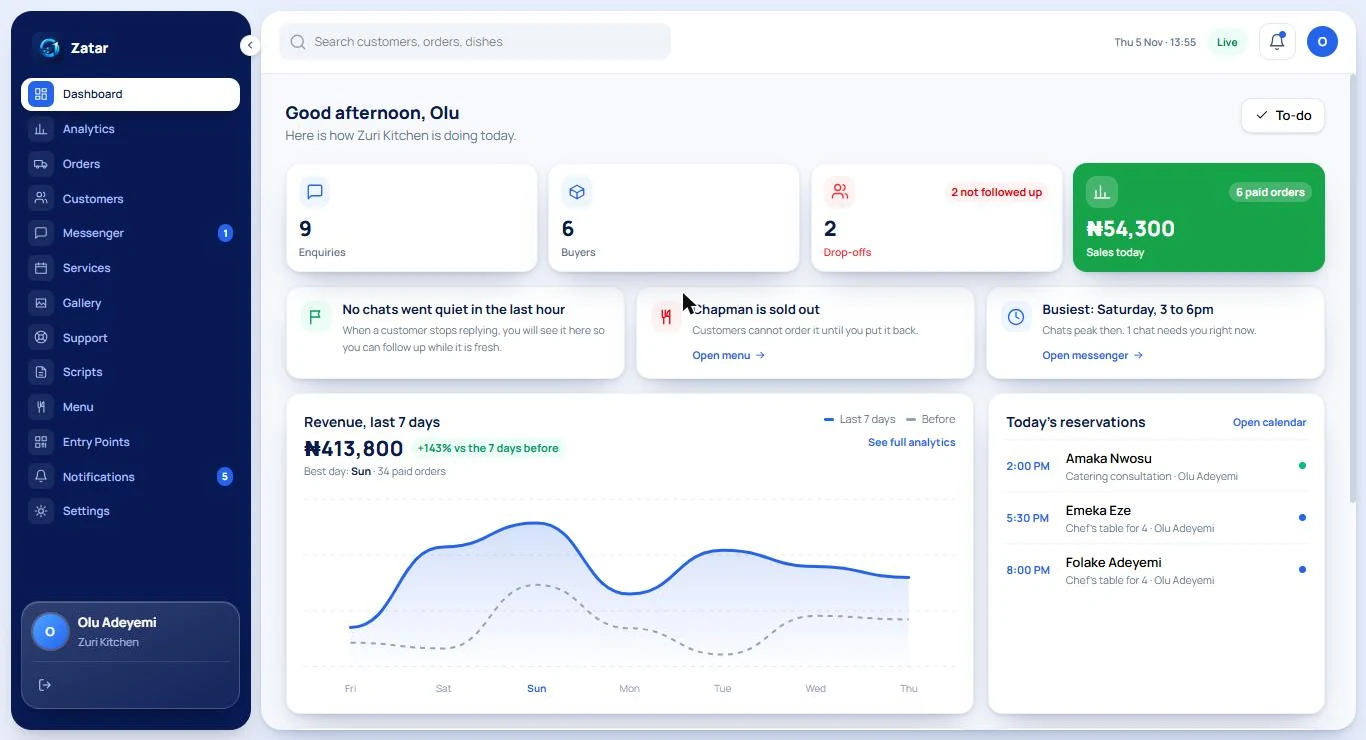
Start every day knowing what needs you
Sales today, new enquiries, buyers and drop-offs sit at the top. Below them, Zatar shows what needs attention now: chats that went quiet, items that sold out, bookings coming up.
Talk to every customer, at any hour
MAY answers first. You step in when it matters.
MAY, your rule-based assistant
Answers from your own Templates and FAQs, shows your real items and prices, and prepares an order or booking for the customer to confirm. Read how MAY works on the MAY page.
Meet MAYMessenger with human hand-over
See every conversation in one inbox. Take over from MAY at any time, assign a chat to a teammate, and add private notes. MAY hands over by herself for complaints, refunds and anything she is unsure about.
Templates and FAQs you control
Edit the wording of every automatic message, add alternate phrasings, and write your own FAQ answers. Nothing is sent that you have not approved.
Memory that customers can see
MAY remembers what a customer chose to tell her, such as an allergy or what to be called. It is shown to your team, it can be deleted, and a customer can say “forget me”.
Support tickets inside chats
Turn a conversation into a ticket with a status and a reply deadline that follows your opening hours. MAY can suggest when a message looks like a problem; you decide.
Test Inbox
Try MAY with your own questions before any customer sees her. Nothing in the Test Inbox counts toward your plan.
Sell what you sell, the way you sell it
The same workspace becomes a menu, a catalog, a calendar or a portfolio.
Catalog, menu and gallery
Products with photos and options, dishes for a menu, services with prices and durations, and a gallery of your work. Which of these you see depends on the kind of business you set up.
Orders and delivery
Follow each order from awaiting payment to packing, out for delivery or ready for pickup, and delivered. See what needs you now, print packing slips and receipts, and take bulk actions.
Delivery confirmed by the customer
An order is only delivered when the customer confirms it with a code given to the rider, with a short window to report a problem. “Delivered” then means delivered.
QR codes and links
Create codes for your counter, a product, a campaign or a place. Print them with the built-in designer and see how many people scan each one.
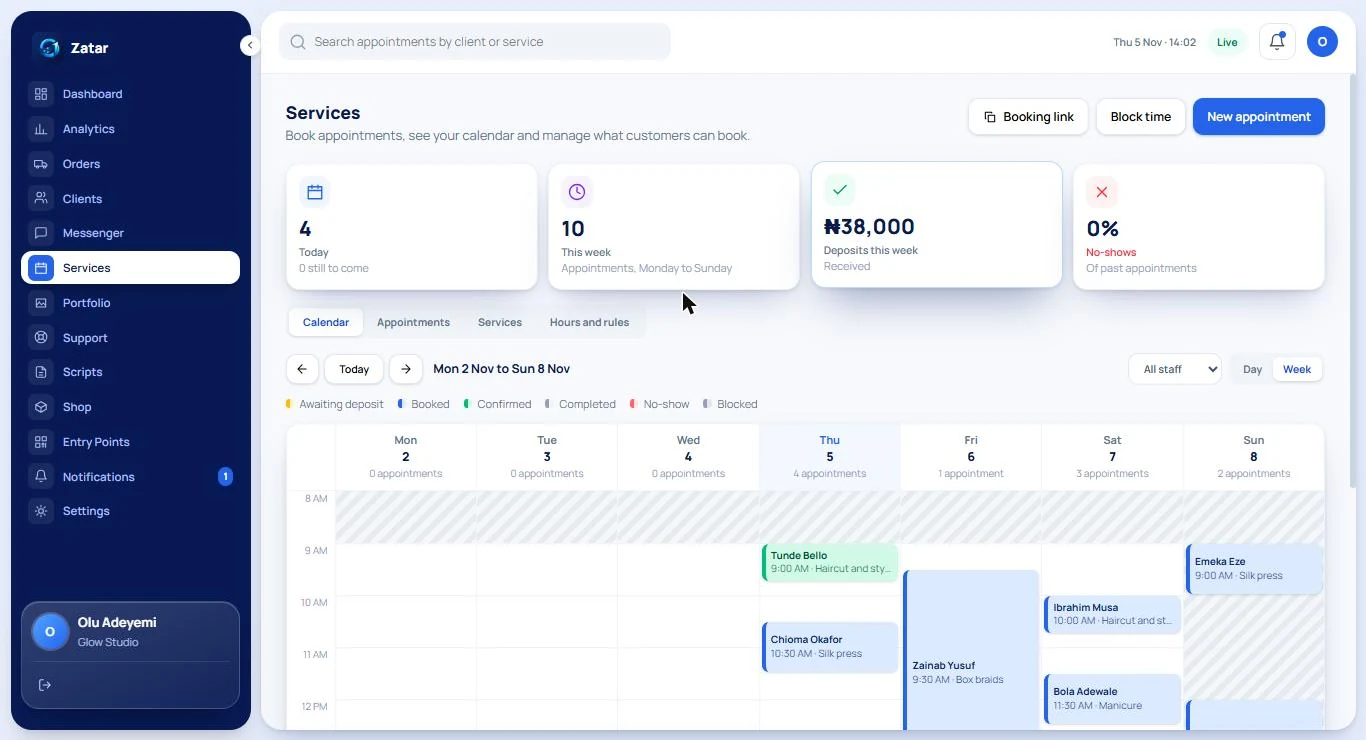
See the whole week at a glance
Each person’s column shows their bookings, colour-coded by status: awaiting deposit, booked, confirmed, completed, no-show. Shaded time is closed, so nobody books it.
Fill your calendar, and keep it full
For salons, studios, barbers and anyone who sells time.
Staff calendars and free times
Zatar works out the free times from your shop hours, each person’s hours, time off, existing bookings and the time you need between them, so customers only see times that are really free.
Deposits that protect your time
Ask for a deposit when a booking is made. The time is held while the customer pays, and you choose whether a deposit is kept or refunded when someone does not show up.
Reminders that cut no-shows
A reminder in chat 24 hours before and 2 hours before, and a text message 12 hours before if the customer has not confirmed. You write the messages.
Rules you set
Minimum notice, how far ahead people can book, free-change windows and a higher deposit after a missed visit. Every rule is yours to change.
Get paid, and know exactly who has paid
Paystack processes the payments. You choose how the money reaches you.
Card, bank transfer and USSD
Customers pay on a secure Paystack page. Zatar never sees or stores card details.
Two ways to get paid
Use Zatar Payments, where Paystack pays out to your own bank account, or connect your own Paystack account and be paid straight into it.
Payment links and receipts
Send a payment link for any order in one tap, set how long it works, cancel unpaid orders automatically, and give customers receipts.
SMS when chat is not enough
Send a text message from a prepaid wallet. You see the cost before you top up, and a message that fails to send is never charged.
Run it with your team, and keep it safe
Everyone sees what they need and nothing more.
Team and roles
Invite people and choose, one by one, what each can see and do. Staff can be limited to their own chats and bookings. Seats depend on your plan.
Activity log
See who changed what and when: settings, payments, team and more. It is the first place to look if something unexpected happens.
Verified owners
Owners confirm their identity before a business opens to customers, and a payout account must be in the owner’s own name.
Security you can read about
Sign-in protection, owner-only controls for money and keys, and a plain-language Security page that says what we do and what we do not.
See what is working
Numbers your business really produces, never made-up benchmarks.
Analytics
Sales, busy times, where customers come from, how many conversations became orders, and how MAY is doing. Growth and Scale add every card, 12 months of history and CSV export.
Notifications
Get told when a customer needs you, an order is unpaid, stock is low or a booking changes. You choose which events reach you.
Customer records
Every customer, their orders and bookings, their tags and your private notes, in one profile your team can search.
One workspace, whatever you sell
- Chats, orders, bookings and payments in one place
- An assistant that never invents your prices
- Your team, your rules, your customers’ data
- Plans from ₦3,000 a month for early supporters
See it for yourself
Create a workspace, set it up with sample data and try MAY in the Test Inbox. It is free and private until you open to customers.