The assistant that answers like you, and never guesses
MAY answers first, says only what you taught her, reads your real prices and brings in a person the moment one is needed.
The first reply, every time, in seconds
A customer opens your QR code or link and starts asking. MAY answers, shows your items, works out what they want, and gets them to the point of ordering or booking. Then she waits for the customer to tap.
- Answers common questions: prices, hours, delivery, how to pay
- Shows your items with their photos and prices
- Adds to an order, suggests free booking times, and prepares checkout
- Tells customers where their order is
- Brings in a teammate when a person is needed
MAY says what you taught her
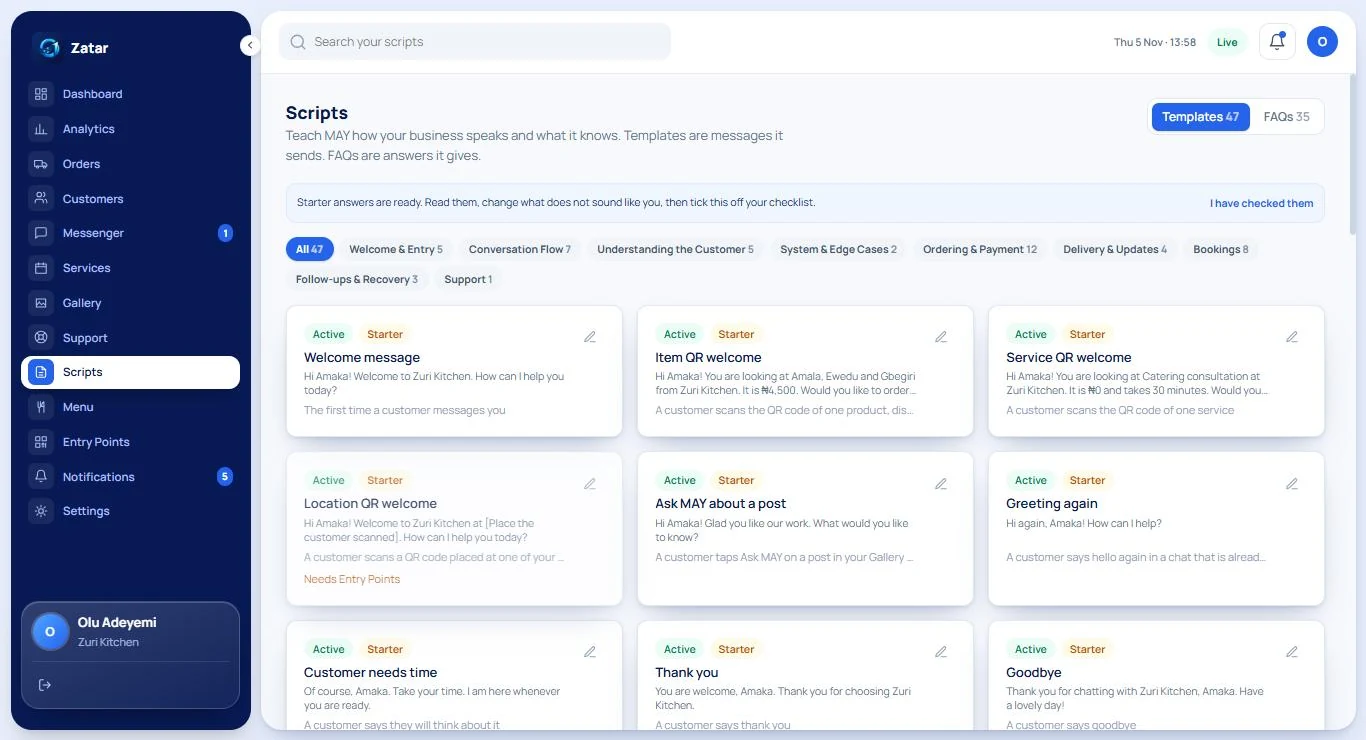
Every automatic message and every FAQ answer is a card you can read and edit. Change the wording, add other ways of saying it, and try it in the Test Inbox before a customer ever sees it.
- Dozens of starter Templates and FAQs, ready to read and change
- Each one can be switched off, reset, or given alternate phrasings
- Nothing is sent that you have not approved
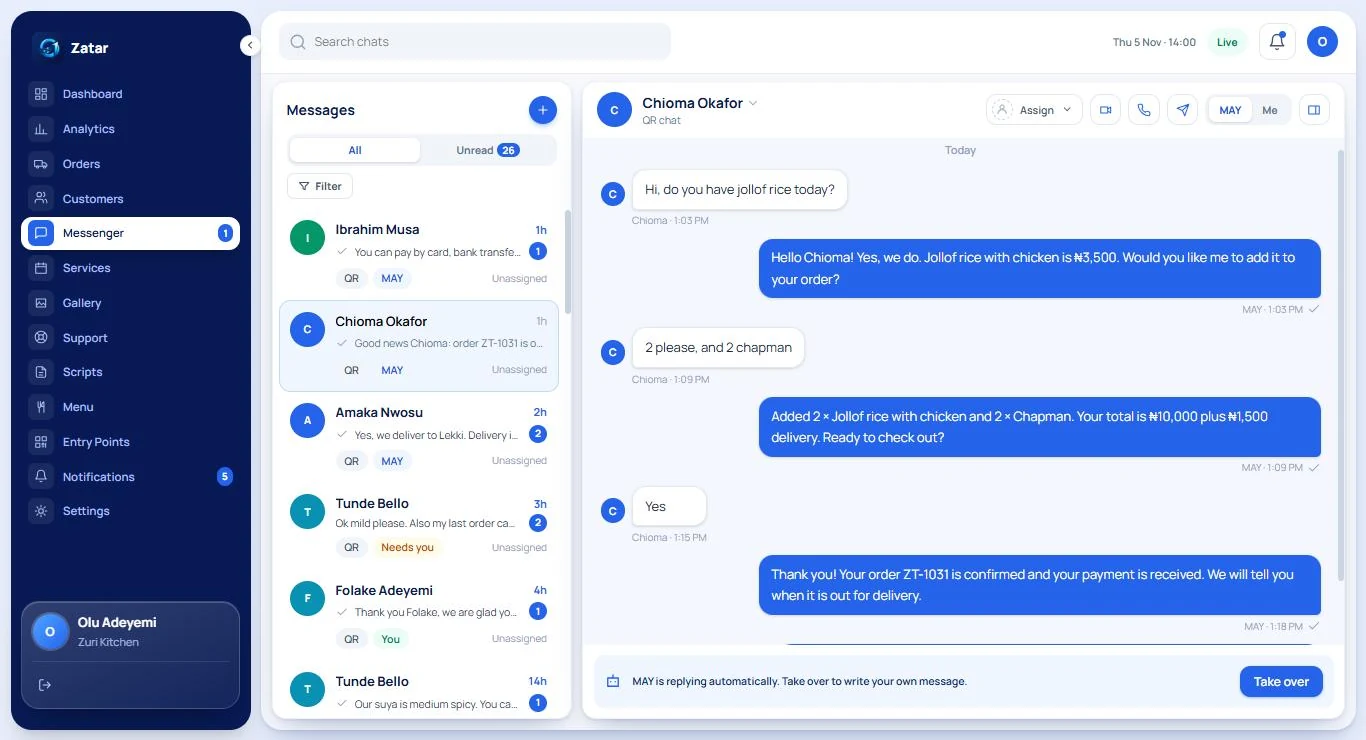
You can step in at any moment
MAY is replying automatically, and the owner can take over with one tap. A chat MAY hands over shows up as “Needs you”, with the reason, so you know where to look first.
Four steps behind every reply
The same careful path runs for every message, so her behaviour is predictable.
- 1
She understands the message
Rules read what the customer means, including simple spelling and word forms. If you switch on an AI reader, it may only choose from things that already exist for your business.
- 2
She finds the right wording
She picks the matching Template or FAQ that you wrote or approved. Each can have several phrasings so she does not sound like a robot repeating herself.
- 3
The system adds the facts
Prices, stock, opening hours, order status and links are filled in live by the system, never written from memory.
- 4
A last check, then send
Before anything is sent it is checked against her rules. If a reply breaks one, it is replaced, or the chat goes to you.
What MAY will never do
These are enforced by the system, not just promised in a description.
- Invent a price, a product or a stock level
- Promise a delivery or arrival time
- Place an order or take a payment by herself: the customer taps to confirm
- Promise a refund or a discount that you have not set
- Ask a customer for a password, a PIN, a one-time code or a card number
- Keep personal details a customer did not choose to share
MAY knows when to call you
She passes the chat to you, and says why, in these cases:
A complaint or an angry customer
A person should read it before anyone replies.
A customer asks for a human
No argument, no loop. The chat comes to you.
She is unsure, twice in a row
After repeated low confidence or a stuck clarification, she steps back.
Sensitive or high-stakes topics
Refunds, payment disputes and anything about health or safety go to a person.
She remembers what customers tell her, and nothing else
In a chat, MAY keeps track of what the customer is talking about, so “the red one” and “the other one” make sense. Across chats she can remember only what a customer chose to tell her about themselves, such as an allergy or what to be called.
Facts like prices, stock and order status are never remembered. They are read live, every time.
- It is visible to your team on the customer’s profile
- It can be deleted, and a customer can say “forget me”
- It fades with time and is kept for a year at most
- You can switch memory off for your business
- MAY tells the customer the first time, in words you can edit
Bring your own AI, on your terms
Zatar works fully without AI. If you want more flexibility, the business owner can connect their own AI key and decide how far it goes.
Your key, your control
Only the owner can connect a key. It is stored encrypted and never shown again. Remove it any time and MAY carries on with rules alone.
You choose how much it may do
For each topic, pick Off, Suggest (it drafts, nothing is sent), Assisted (it replies, bargaining stays a draft) or Full (it can also bargain inside the limits you set).
A first week to judge it
In the first week nothing is sent. The AI writes what it would have said, and you mark each draft good or not right before it goes live.
Privacy by design
Requests are sent only to providers that do not keep or train on the data, and the AI cannot write prices or bank details: those are added by the system.
About MAY
Can MAY say something wrong about my prices?
Does MAY write her own sentences?
What if MAY does not understand a customer?
Can customers talk to MAY in Pidgin?
Can I turn MAY off for a conversation?
Try MAY with your own questions
Create a workspace and open the Test Inbox. Ask what your customers ask. Nothing is sent to anyone.